

Google Business (GBP): A Guide for Enhancing Google Listings
Google Business (GBP) is an essential tool for local SEO, enabling businesses to manage their online presence across Google, including Search and Maps. An optimized GBP listing enhances visibility, helps attract more customers, and increases trust through reviews and ratings. We will guide you through the essentials of GBP, starting with how to create and claim your listing. We’ll also delve into strategic practices for optimizing your GBP profile to maximize your local visibility and attract a targeted customer base in your area.
Step-by-Step Guide on Creating a GBP Listing
Signing Up for a Google Account
The first requirement is to have a Google account to initiate setting up a Google Business listing. If you don’t already have one, you can create one by visiting Google’s homepage and clicking on the sign-in option, where you’ll find the link to sign up. This account will be your gateway to not just GBP but other Google services as well. Ensure that the information associated with your Google account is secure and up-to-date, as it will be linked to your business details.
Entering Business Details
Once you have a Google account, the next step in creating a Google Business listing is to enter your business details. This includes your business name, physical address, phone number, and website. It’s crucial to ensure that all information is accurate and consistent with other online listings, as discrepancies can confuse potential customers and negatively impact your local SEO. Accuracy in your business details enhances your business’s reliability, making it easier for customers to trust and locate your services.
Choosing the Right Business Category
Selecting the appropriate business category is vital as it helps Google classify your business and connect you to customers searching for your services. Google Business provides a list of categories, or you can type in keywords to find the one that best fits your business. This category should reflect your core offering to ensure you appear in relevant searches, essential for reaching the right audience.
How to Claim an Existing GBP Listing
Verification Process
Claiming your Google Business listing typically involves a verification process. Google offers several methods to verify your business, including phone, email, or postcard. Most small businesses are required to confirm by postcard. Google will mail a postcard with a verification code to the business address listed. Once received, enter this code into your GBP account to confirm your location at the given address. This step is crucial for the authenticity of your business on Google.
Handling Pre-Claimed Listings
If you discover that your business listing has already been claimed by someone else, Google provides a process to regain control. You can request ownership of the listing by selecting the ‘Claim this business’ or ‘Own this business?’ option and following the prompts. Google will then guide you through steps to verify your affiliation with the business. You can also report an unauthorized listing through Google’s support to resolve potential conflicts or inaccuracies, ensuring that the rightful owner manages the listing.
Optimizing Your GBP Profile
Importance of Complete and Accurate Business Information
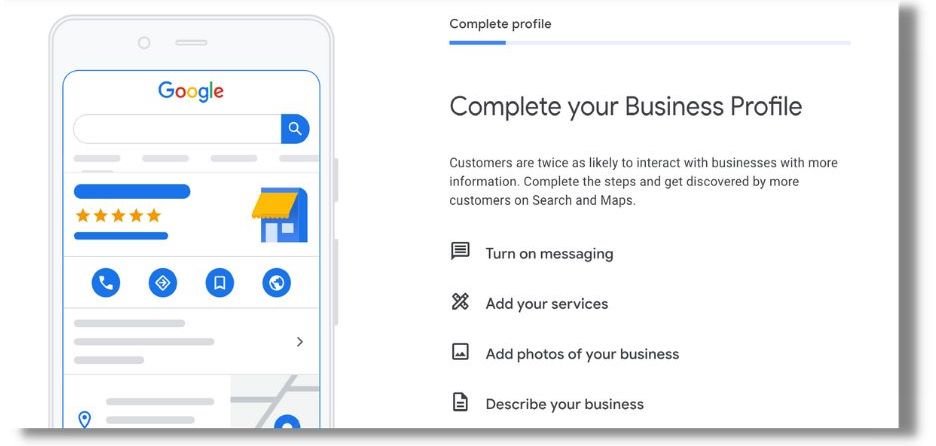
Ensuring that your Google Business (GBP) profile contains complete and accurate information is crucial for maximizing your business’s visibility and credibility online. Accurate information helps Google match your business more effectively with user searches, increasing your chances of appearing in relevant local search results. Key details like your business name, address, phone number, and operating hours must be consistently updated to reflect changes. This consistency not only improves your search performance but also prevents customer confusion. A complete GBP profile also includes high-quality photos of your business, which can significantly enhance user engagement by giving potential customers a visual understanding of what to expect.
Tips for Writing a Compelling Business Description
A compelling business description on your GBP profile serves as a brief but powerful overview of what your business offers and what sets it apart from competitors. This description should be concise, clear, and tailored to your target audience, highlighting unique aspects such as your mission, history, or special services. Use relevant keywords that potential customers might use to find services like yours, but ensure the text flows naturally and is easy to read. Additionally, maintaining an active tone and focusing on customer benefits (e.g., “We deliver within 24 hours”) can make your description more appealing. This narrative is not just a list of services but a chance to make a first impression and establish trust with potential customers.
Selecting Attributes That Match Your Business Services and Offerings
Choosing the right attributes for your Google Business profile is essential for accurately representing your services and offerings. GBP attributes allow you to highlight specific features of your business, such as ‘free Wi-Fi,’ ‘wheelchair accessible,’ or ‘outdoor seating,’ which can be critical decision-making factors for customers. Tailoring these attributes to match your business ensures that your GBP listing speaks directly to the needs and preferences of your customers, making it more likely that they will choose your business over others. Regularly updating these attributes to reflect new services or features is vital as it keeps your profile current and relevant to customer searches. Accurately selected attributes can enhance your profile’s effectiveness by providing clear, direct information that helps customers make informed decisions.
Enhancing Visibility Through Posts and Updates
Overview of GBP Posts and Their Types
Google Business (GBP) posts are a dynamic feature that allows businesses to communicate directly with their customers right in their GBP listing. These posts can be categorized into several types, each serving a unique purpose. Offers provide special promotions to your customers, Events announce upcoming activities, Updates share important news about your business, and Products highlight new or featured items. Utilizing these posts can significantly increase interaction with your GBP profile as they capture the attention of potential customers actively searching for your offer. By strategically using different types of posts, businesses can keep their audience informed and engaged, directly influencing their decision-making process.
Best Practices for Creating Engaging GBP Posts
Creating engaging GBP posts involves more than just posting regularly. Each post should be crafted with a clear, compelling message and include a call-to-action (CTA) that prompts customers to engage with your business, whether visiting your website, making a phone call, or taking advantage of a special offer. High-quality images or videos can significantly enhance the appeal of your posts, as visual content is more likely to attract attention and encourage sharing. Additionally, ensure your posts are directly relevant to your audience’s interests and needs. Personalizing your content to reflect seasonal themes, local events, or trending topics can increase relevancy and engagement.
Frequency and Timing of Posts for Maximum Engagement
The frequency and timing of your GBP posts can greatly affect their effectiveness. Regular posting keeps your business relevant and at the top of customers’ minds, but over-posting can lead to fatigue and disengagement. A balanced approach would be to post 1-2 times weekly, ensuring your content remains fresh and exciting without overwhelming your audience. Timing your posts to coincide with when your audience is most active online increases visibility. For instance, late afternoon or early evening posting may catch people as they are winding down from work, potentially increasing engagement. Analyzing the performance of your posts can also help identify the best times for future posts, explicitly tailored to when your customers are most receptive.

Managing and Responding to Reviews
The Impact of Reviews on Local SEO and Business Credibility
Reviews are critical to local SEO and directly impact a business’s credibility and trustworthiness. High-quality, positive reviews can improve your business’s visibility in search results, as Google prioritizes businesses that are well-regarded by customers. Additionally, reviews provide valuable customer feedback that can help businesses improve their products or services. While potentially harmful, negative reviews offer a chance to address issues and demonstrate commitment to customer service. Overall, the presence and quality of reviews contribute to the online reputation of a business, influencing both customer perception and search engine ranking.
Strategies for Encouraging Customers to Leave Positive Reviews
Encouraging customers to leave positive reviews is essential for enhancing your online presence and attracting more business. One effective strategy is to create a simple, streamlined process for leaving reviews by providing direct links to your Google Business review page in follow-up emails, receipts, or thank-you notes. Training staff to remind customers to leave a review after a positive experience can also be beneficial. Offering incentives, such as discounts on future purchases or contest entries, can motivate customers to share their experiences. Importantly, genuine customer engagement and exceptional service are fundamental to receiving positive reviews naturally.
Guidelines for Responding to Both Positive and Negative Reviews
Responding to reviews is just as crucial as receiving them. For positive reviews, a simple thank you message acknowledges the reviewer’s effort and reinforces positive relations. Responses should be personalized, reflecting the specifics mentioned in the review, which shows that your business values customer feedback and pays attention to details. For negative reviews, it’s important to respond professionally and calmly, regardless of the review’s tone. Apologize for any issues experienced, offer to resolve the matter offline, and demonstrate a commitment to improving service. This approach not only potentially salvages a strained customer relationship but also shows other prospective customers that your business handles criticism gracefully and is dedicated to continuous improvement.
Leveraging Local Citations for GBP Optimization
Explanation of Local Citations and Their Importance for GBP
Local citations are mentions of your business on other websites and directories, which include your business name, address, and phone number, collectively known as NAP information. These citations play a crucial role in local search engine optimization (SEO) because they help to verify the authenticity of a business’s physical location. Google uses these citations as one factor to determine a business’s relevance and trustworthiness in local search rankings. A higher number of quality citations can improve your Google Business (GBP) profile’s visibility in search results, making your business more accessible to potential customers. Ensuring your business is accurately listed across various reputable platforms boosts your SEO and strengthens your online presence, giving you a competitive edge in local markets.
How to Ensure NAP Consistency Across the Web
Maintaining consistency in your NAP details across all platforms and directories is vital for maximizing the SEO benefits of local citations. Inconsistencies in your business’s name, address, or phone number can confuse both potential customers and search engines, potentially harming your search rankings. To ensure NAP consistency, start by auditing all listings of your business across the internet, including social media profiles, directories, and industry-specific platforms. Update any discrepancies or outdated information immediately. This process should be an ongoing part of your digital marketing strategy, with regular checks to ensure all information remains current and consistent, particularly if there are changes to your business operations or contact details.
Tools and Services for Managing Local Citations
Several tools and services can streamline the management of local citations, ensuring accuracy and consistency without demanding excessive time and effort. Services like Moz Local, Yext, and BrightLocal allow businesses to manage their listings across multiple platforms from a single dashboard. These tools typically offer features such as automatic updates to NAP information, duplicate removal, and alerts for review or listing changes. Investing in one of these services can be particularly beneficial for businesses with multiple locations or highly competitive industries, as they help maintain a robust online presence. By leveraging these tools, businesses can focus more on their core operations while ensuring their local SEO efforts are optimized and effective.
Utilizing GBP Insights for Better Engagement
Introduction to GBP Insights and the Data It Provides
Google Business (GBP) Insights offers robust tools that provide detailed data about how customers interact with your GBP listing. This service allows business owners to understand who their customers are and how they found the business listing—whether through Google Search or Maps, and what actions they took, such as visiting the website, requesting directions, or calling directly from the listing. Insights also track engagement metrics like the number of views your photos receive compared to others in your category. This information is crucial for businesses looking to refine their online presence and marketing strategies tailored to attract and retain customers.
Analyzing Customer Interaction Data to Improve Engagement
To effectively utilize GBP Insights, it’s essential to review and analyze customer interaction data regularly. This analysis can reveal patterns and trends, such as peak times for customer engagement or the most popular services/products. By understanding what drives customer actions, businesses can tailor their content, update their photos, and adjust their posting schedules to better align with customer behaviors and preferences. For instance, if data shows that many users request directions to your location in the late afternoon, consider highlighting your after-work specials or events during these hours to capture more of this traffic. Regular analysis helps continuously optimize your GBP listing to improve user engagement.
Adjusting Business Strategies Based on GBP Analytics
GBP Insights provides actionable analytics that can inform broader business strategies. For example, suppose Insights reveals that a significant portion of your GBP traffic comes from mobile users. In that case, it might be beneficial to ensure that your linked website is optimized for mobile devices. Similarly, if certain posts or types of engagement lead to more customer interactions, these insights can guide your content strategy, helping you focus more on what works best. Businesses can also use geographic data from GBP to tailor marketing campaigns to specific regions or demographics, enhancing the effectiveness of their advertising spend. Continuously adapting your business strategy based on GBP analytics helps maintain relevance and achieve sustained growth in customer engagement.
Final Thoughts
Optimizing your Google Business (GBP) listing is a pivotal strategy for any local business aiming to enhance visibility and attract more customers. Businesses can significantly improve their online presence through detailed and strategic adjustments, from ensuring accurate business information to engaging actively with customers via reviews and posts. Embracing the full suite of features offered by GBP enhances your listing and provides valuable insights into customer behavior and preferences. By consistently applying these optimizations, businesses can increase their visibility in local search results and build stronger connections with their community. The efforts invested in GBP optimization are invaluable, empowering businesses to thrive in a competitive digital landscape and ensuring they remain at the forefront of potential customers’ minds when choosing.


